Video Palettes
CGA Text Mode
In color text modes, the CGA card can emit a total of 16 different colors - a combination of the four video signals: red, green, blue, and intensity - a signal that boosts the brightness of the previous three color signals. Note that the intensity bit also boosts the apparent brightness of pure black, creating a dim gray.
Note
The standard CGA brown color is not the same color emitted by the CGA card; the conversion of “dark yellow” to brown occurs via special circuitry within the IBM 5153 Color Display and most CGA-compatible monitors.
The Standard PC 4-bit RGBI Gamut
| R | G | B | I | Color | Hex |
|---|---|---|---|---|---|
| 0 | 0 | 0 | 0 | 000000 | |
| 0 | 0 | 1 | 0 | 0000AA | |
| 0 | 1 | 0 | 0 | 00AA00 | |
| 0 | 1 | 1 | 0 | 00AAAA | |
| 1 | 0 | 0 | 0 | AA0000 | |
| 1 | 0 | 1 | 0 | AA00AA | |
| 1 | 1 | 0 | 0 | AA5500 | |
| 1 | 1 | 1 | 0 | AAAAAA | |
| 0 | 0 | 0 | 1 | 555555 | |
| 0 | 0 | 1 | 1 | 5555FF | |
| 0 | 1 | 0 | 1 | 55FF55 | |
| 0 | 1 | 1 | 1 | 55FFFF | |
| 1 | 0 | 0 | 1 | FF5555 | |
| 1 | 0 | 1 | 1 | FF55FF | |
| 1 | 1 | 0 | 1 | FFFF55 | |
| 1 | 1 | 1 | 1 | FFFFFF |
The “IBM 5153” Palette
The aforementioned palette represents “ideal” colors - theoretically perfect color outputs. Modern displays have no problem rendering such colors, but original CGA monitors such as the IBM 5153 Color Display had their own eccentricities.
Taking into account the electrical characteristics of the 5153, a more visually authentic CGA palette can be derived1:
| R | G | B | I | Color | Hex |
|---|---|---|---|---|---|
| 0 | 0 | 0 | 0 | 000000 | |
| 0 | 0 | 1 | 0 | 0000C4 | |
| 0 | 1 | 0 | 0 | 00C400 | |
| 0 | 1 | 1 | 0 | 00C4C4 | |
| 1 | 0 | 0 | 0 | C40000 | |
| 1 | 0 | 1 | 0 | C400C4 | |
| 1 | 1 | 0 | 0 | C47E00 | |
| 1 | 1 | 1 | 0 | C4C4C4 | |
| 0 | 0 | 0 | 1 | 4E4E4E | |
| 0 | 0 | 1 | 1 | 4E4EDC | |
| 0 | 1 | 0 | 1 | 4EDC4E | |
| 0 | 1 | 1 | 1 | 4EF3F3 | |
| 1 | 0 | 0 | 1 | DC4E4E | |
| 1 | 0 | 1 | 1 | F34EF3 | |
| 1 | 1 | 0 | 1 | F3F34E | |
| 1 | 1 | 1 | 1 | FFFFFF |
CGA Graphics Modes
Although much is said - derisively - about the CGA’s ugly ‘palettes’, the IBM CGA card does not actually have what we would typically consider palettes at all.
In graphics mode, pairs of bits from video memory drive the red and green video output lines directly, with no color look-ups performed. The effect of having multiple palettes is produced by miscellaneous logic that determines if and when the blue video output is additionally enabled or not.
When both bits from video memory are 0, the background/overscan color configured in the CGA Color Control register is substituted. Black is not a requirement for any of the CGA’s palettes.
The intensity bit, specified in the CGA Color Control register, provides two variations of brightness per palette.
Default Palette (Blue Disabled)
| R | G | B | I | Color | Hex |
|---|---|---|---|---|---|
| 0 | 0 | 0 | 0 | Overscan | |
| 0 | 1 | 0 | 0 | 00AA00 | |
| 1 | 0 | 0 | 0 | AA0000 | |
| 1 | 1 | 0 | 0 | AA5500 |
| R | G | B | I | Color | Hex |
|---|---|---|---|---|---|
| 0 | 0 | 0 | 1 | Overscan | |
| 0 | 1 | 0 | 1 | 55FF55 | |
| 1 | 0 | 0 | 1 | FF5555 | |
| 1 | 1 | 0 | 1 | FFFF55 |
Secondary Palette (Blue Enabled)
| R | G | B | I | Color | Hex |
|---|---|---|---|---|---|
| 0 | 0 | 0 | 0 | Overscan | |
| 0 | 1 | 1 | 0 | 00AAAA | |
| 1 | 0 | 1 | 0 | AA00AA | |
| 1 | 1 | 1 | 0 | AAAAAA |
| R | G | B | I | Color | Hex |
|---|---|---|---|---|---|
| 0 | 0 | 0 | 1 | Overscan | |
| 0 | 1 | 1 | 1 | 55FFFF | |
| 1 | 0 | 1 | 1 | FF55FF | |
| 1 | 1 | 1 | 1 | FFFFFF |
Alternate Palette (Blue Enabled Except When Red)
Sometimes described as a “hidden” palette, and often considered the most aesthetically pleasing, the cyan-red-white palette was only implemented to provide better contrast when displaying CGA graphics modes on a monochrome composite display, such as a black-and-white television set. It was not implemented for its aesthetics, and thus IBM probably didn’t see fit to document it as a color option - after all, later revisions of the CGA could have always disabled the need for it by adjustments to the composite output circuitry.
This palette is created by miscellaneous logic that enables the blue video output unless the color red is decoded.
| R | G | B | I | Color | Hex |
|---|---|---|---|---|---|
| 0 | 0 | 0 | 0 | Overscan | |
| 0 | 1 | 1 | 0 | 00AAAA | |
| 1 | 0 | 0 | 0 | AA0000 | |
| 1 | 1 | 1 | 0 | AAAAAA |
| R | G | B | I | Color | Hex |
|---|---|---|---|---|---|
| 0 | 0 | 0 | 1 | Overscan | |
| 0 | 1 | 1 | 1 | 55FFFF | |
| 1 | 0 | 0 | 1 | FF5555 | |
| 1 | 1 | 1 | 1 | FFFFFF |
CGA Composite Colors
These are the 16 primary colors produced via composite artifact color in the CGA’s high-resolution graphics mode with a foreground color of white. This was the typical mode used to display graphics on composite monitors and television sets. The hexadecimal values are approximate. The actual appearance of colors could vary from display to display or a user’s specific set adjustments — part of what earned NTSC the playful moniker, Never The Same Color Twice.
Many more composite colors are possible in color modes - over 1000, in fact.2
The bit order is from left-to-right, as the raster travels. Four pixels fit into a single period of the NTSC color clock, so a four-pixel span gives a basic “color pixel”. Emulation of composite artifact color is a complex topic, but in general, one cannot simply use these values as 4-bit palette lookups, but must simulate more advanced processes like luma and chroma signal separation.
| B0 | B1 | B2 | B3 | Color | Hex |
|---|---|---|---|---|---|
| 0 | 0 | 0 | 0 | 000000 | |
| 0 | 0 | 0 | 1 | 00680C | |
| 0 | 0 | 1 | 0 | 212BBD | |
| 0 | 0 | 1 | 1 | 0D9ED5 | |
| 0 | 1 | 0 | 0 | 85096C | |
| 0 | 1 | 0 | 1 | 757376 | |
| 0 | 1 | 1 | 0 | AF36FF | |
| 0 | 1 | 1 | 1 | 9BA9FF | |
| 1 | 0 | 0 | 0 | 514700 | |
| 1 | 0 | 0 | 1 | 42BD00 | |
| 1 | 0 | 1 | 0 | 707470 | |
| 1 | 0 | 1 | 1 | 5DF47A | |
| 1 | 1 | 0 | 0 | E5541D | |
| 1 | 1 | 0 | 1 | D7CB19 | |
| 1 | 1 | 1 | 0 | FF81F2 | |
| 1 | 1 | 1 | 1 | FDFFFC |
The composite colors can alternatively be sorted by hue:
| B0 | B1 | B2 | B3 | Color | Hex |
|---|---|---|---|---|---|
| 0 | 0 | 0 | 1 | 00680C | |
| 1 | 0 | 0 | 1 | 42BD00 | |
| 1 | 0 | 1 | 1 | 5DF47A | |
| 0 | 0 | 1 | 0 | 212BBD | |
| 0 | 0 | 1 | 1 | 0D9ED5 | |
| 0 | 1 | 1 | 1 | 9BA9FF | |
| 0 | 1 | 0 | 0 | 85096C | |
| 0 | 1 | 1 | 0 | AF36FF | |
| 1 | 1 | 1 | 0 | FF81F2 | |
| 1 | 0 | 0 | 0 | 514700 | |
| 1 | 1 | 0 | 0 | E5541D | |
| 1 | 1 | 0 | 1 | D7CB19 |
Or by hue and luminosity:
| B0 | B1 | B2 | B3 | Color | Hex | B0 | B1 | B2 | B3 | Color | Hex | B0 | B1 | B2 | B3 | Color | Hex |
|---|---|---|---|---|---|---|---|---|---|---|---|---|---|---|---|---|---|
| 0 | 0 | 0 | 1 | 00680C | 1 | 0 | 0 | 1 | 42BD00 | 1 | 0 | 1 | 1 | 5DF47A | |||
| 0 | 0 | 1 | 0 | 212BBD | 0 | 0 | 1 | 1 | 0D9ED5 | 0 | 1 | 1 | 1 | 9BA9FF | |||
| 0 | 1 | 0 | 0 | 85096C | 0 | 1 | 1 | 0 | AF36FF | 1 | 1 | 1 | 0 | FF81F2 | |||
| 1 | 0 | 0 | 0 | 514700 | 1 | 1 | 0 | 0 | E5541D | 1 | 1 | 0 | 1 | D7CB19 |
EGA 6-bit Color Gamut (64 Colors)
The EGA can display any 16 of these 64 colors simultaneously when connected to an EGA monitor and operating in 350 line mode, although there are exceptions that enable use of 6bpp color in 200 line modes with the right hardware.
| Index | RI | GI | BI | R | G | B | Color | Hex | Index | RI | GI | BI | R | G | B | Color | Hex |
|---|---|---|---|---|---|---|---|---|---|---|---|---|---|---|---|---|---|
| 00 | 0 | 0 | 0 | 0 | 0 | 0 | 000000 | 20 | 1 | 0 | 0 | 0 | 0 | 0 | 550000 | ||
| 01 | 0 | 0 | 0 | 0 | 0 | 1 | 0000AA | 21 | 1 | 0 | 0 | 0 | 0 | 1 | 5500AA | ||
| 02 | 0 | 0 | 0 | 0 | 1 | 0 | 00AA00 | 22 | 1 | 0 | 0 | 0 | 1 | 0 | 55AA00 | ||
| 03 | 0 | 0 | 0 | 0 | 1 | 1 | 00AAAA | 23 | 1 | 0 | 0 | 0 | 1 | 1 | 55AAAA | ||
| 04 | 0 | 0 | 0 | 1 | 0 | 0 | AA0000 | 24 | 1 | 0 | 0 | 1 | 0 | 0 | FF0000 | ||
| 05 | 0 | 0 | 0 | 1 | 0 | 1 | AA00AA | 25 | 1 | 0 | 0 | 1 | 0 | 1 | FF00AA | ||
| 06 | 0 | 0 | 0 | 1 | 1 | 0 | AAAA00 | 26 | 1 | 0 | 0 | 1 | 1 | 0 | FFAA00 | ||
| 07 | 0 | 0 | 0 | 1 | 1 | 1 | AAAAAA | 27 | 1 | 0 | 0 | 1 | 1 | 1 | FFAAAA | ||
| 08 | 0 | 0 | 1 | 0 | 0 | 0 | 000055 | 28 | 1 | 0 | 1 | 0 | 0 | 0 | 550055 | ||
| 09 | 0 | 0 | 1 | 0 | 0 | 1 | 0000FF | 29 | 1 | 0 | 1 | 0 | 0 | 1 | 5500FF | ||
| 0A | 0 | 0 | 1 | 0 | 1 | 0 | 00AA55 | 2A | 1 | 0 | 1 | 0 | 1 | 0 | 55AA55 | ||
| 0B | 0 | 0 | 1 | 0 | 1 | 1 | 00AAFF | 2B | 1 | 0 | 1 | 0 | 1 | 1 | 55AAFF | ||
| 0C | 0 | 0 | 1 | 1 | 0 | 0 | AA0055 | 2C | 1 | 0 | 1 | 1 | 0 | 0 | FF0055 | ||
| 0D | 0 | 0 | 1 | 1 | 0 | 1 | AA00FF | 2D | 1 | 0 | 1 | 1 | 0 | 1 | FF00FF | ||
| 0E | 0 | 0 | 1 | 1 | 1 | 0 | AAAA55 | 2E | 1 | 0 | 1 | 1 | 1 | 0 | FFAA55 | ||
| 0F | 0 | 0 | 1 | 1 | 1 | 1 | AAAAFF | 2F | 1 | 0 | 1 | 1 | 1 | 1 | FFAAFF | ||
| 10 | 0 | 1 | 0 | 0 | 0 | 0 | 005500 | 30 | 1 | 1 | 0 | 0 | 0 | 0 | 555500 | ||
| 11 | 0 | 1 | 0 | 0 | 0 | 1 | 0055AA | 31 | 1 | 1 | 0 | 0 | 0 | 1 | 5555AA | ||
| 12 | 0 | 1 | 0 | 0 | 1 | 0 | 00FF00 | 32 | 1 | 1 | 0 | 0 | 1 | 0 | 55FF00 | ||
| 13 | 0 | 1 | 0 | 0 | 1 | 1 | 00FFAA | 33 | 1 | 1 | 0 | 0 | 1 | 1 | 55FFAA | ||
| 14 | 0 | 1 | 0 | 1 | 0 | 0 | AA5500 | 34 | 1 | 1 | 0 | 1 | 0 | 0 | FF5500 | ||
| 15 | 0 | 1 | 0 | 1 | 0 | 1 | AA55AA | 35 | 1 | 1 | 0 | 1 | 0 | 1 | FF55AA | ||
| 16 | 0 | 1 | 0 | 1 | 1 | 0 | AAFF00 | 36 | 1 | 1 | 0 | 1 | 1 | 0 | FFFF00 | ||
| 17 | 0 | 1 | 0 | 1 | 1 | 1 | AAFFAA | 37 | 1 | 1 | 0 | 1 | 1 | 1 | FFFFAA | ||
| 18 | 0 | 1 | 1 | 0 | 0 | 0 | 005555 | 38 | 1 | 1 | 1 | 0 | 0 | 0 | 555555 | ||
| 19 | 0 | 1 | 1 | 0 | 0 | 1 | 0055FF | 39 | 1 | 1 | 1 | 0 | 0 | 1 | 5555FF | ||
| 1A | 0 | 1 | 1 | 0 | 1 | 0 | 00FF55 | 3A | 1 | 1 | 1 | 0 | 1 | 0 | 55FF55 | ||
| 1B | 0 | 1 | 1 | 0 | 1 | 1 | 00FFFF | 3B | 1 | 1 | 1 | 0 | 1 | 1 | 55FFFF | ||
| 1C | 0 | 1 | 1 | 1 | 0 | 0 | AA5555 | 3C | 1 | 1 | 1 | 1 | 0 | 0 | FF5555 | ||
| 1D | 0 | 1 | 1 | 1 | 0 | 1 | AA55FF | 3D | 1 | 1 | 1 | 1 | 0 | 1 | FF55FF | ||
| 1E | 0 | 1 | 1 | 1 | 1 | 0 | AAFF55 | 3E | 1 | 1 | 1 | 1 | 1 | 0 | FFFF55 | ||
| 1F | 0 | 1 | 1 | 1 | 1 | 1 | AAFFFF | 3F | 1 | 1 | 1 | 1 | 1 | 1 | FFFFFF |
The VGA Color Gamut
The VGA’s color registers are 18-bit, assigning 6 bits each to the primary colors red, green and blue. This produces a total of 262,144 colors, visualized as a 512x512 bitmap below.
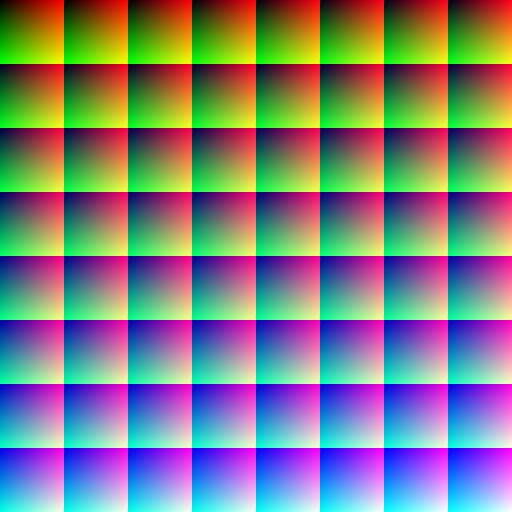
The VGA color gamut
The Default VGA Palettes
Out of the 262,144 colors possible, the VGA can store 256 at a time in its color registers. There are two default VGA palettes: one for 8bpp mode, and one for all other modes. The default VGA palette in 8bpp mode is shown below. The default VGA palette in all other modes is the same as the EGA color gamut in the first 64 color registers with black in the remaining 192 color registers.
The VGA still has the 16 Attribute Controller Palette registers, which are used in text mode and 4bpp modes, however they no longer store color information. Instead, they contain indexes into the 256 color registers of the DAC. This DAC lookup is always active. The Attribute Palette registers are initialized to select the colors that correspond to the traditional 16 color RGBI palette from the EGA color gamut in the DAC.
The Attribute Palette registers remain 6 bits, and so they can only reference a total of 64 DAC Color registers. Due to this, the VGA divides the 256 total Color registers into four separate banks, which can be selected independently.
The first 16 colors of the default VGA palette in 8bpp mode correspond to the traditional 16 color RGBI palette.
| 000000 | 0000AA | 00AA00 | 00AAAA | AA0000 | AA00AA | AA5500 | AAAAAA | 555555 | 5555FF | 55FF55 | 55FFFF | FF5555 | FF55FF | FFFF55 | FFFFFF |
| 000000 | 141414 | 202020 | 2C2C2C | 383838 | 454545 | 515151 | 616161 | 717171 | 828282 | 929292 | A2A2A2 | B6B6B6 | CBCBCB | E3E3E3 | FFFFFF |
| 0000FF | 4100FF | 7D00FF | BE00FF | FF00FF | FF00BE | FF007D | FF0041 | FF0000 | FF4100 | FF7D00 | FFBE00 | FFFF00 | BEFF00 | 7DFF00 | 41FF00 |
| 00FF00 | 00FF41 | 00FF7D | 00FFBE | 00FFFF | 00BEFF | 007DFF | 0041FF | 7D7DFF | 9E7DFF | BE7DFF | DF7DFF | FF7DFF | FF7DDF | FF7DBE | FF7D9E |
| FF7D7D | FF9E7D | FFBE7D | FFDF7D | FFFF7D | DFFF7D | BEFF7D | 9EFF7D | 7DFF7D | 7DFF9E | 7DFFBE | 7DFFDF | 7DFFFF | 7DDFFF | 7DBEFF | 7D9EFF |
| B6B6FF | C7B6FF | DBB6FF | EBB6FF | FFB6FF | FFB6EB | FFB6DB | FFB6C7 | FFB6B6 | FFC7B6 | FFDBB6 | FFEBB6 | FFFFB6 | EBFFB6 | DBFFB6 | C7FFB6 |
| B6FFB6 | B6FFC7 | B6FFDB | B6FFEB | B6FFFF | B6EBFF | B6DBFF | B6C7FF | 000071 | 1C0071 | 380071 | 550071 | 710071 | 710055 | 710038 | 71001C |
| 710000 | 711C00 | 713800 | 715500 | 717100 | 557100 | 387100 | 1C7100 | 007100 | 00711C | 007138 | 007155 | 007171 | 005571 | 003871 | 001C71 |
| 383871 | 453871 | 553871 | 613871 | 713871 | 713861 | 713855 | 713845 | 713838 | 714538 | 715538 | 716138 | 717138 | 617138 | 557138 | 457138 |
| 387138 | 387145 | 387155 | 387161 | 387171 | 386171 | 385571 | 384571 | 515171 | 595171 | 615171 | 695171 | 715171 | 715169 | 715161 | 715159 |
| 715151 | 715951 | 716151 | 716951 | 717151 | 697151 | 617151 | 597151 | 517151 | 517159 | 517161 | 517169 | 517171 | 516971 | 516171 | 515971 |
| 000041 | 100041 | 200041 | 300041 | 410041 | 410030 | 410020 | 410010 | 410000 | 411000 | 412000 | 413000 | 414100 | 304100 | 204100 | 104100 |
| 004100 | 004110 | 004120 | 004130 | 004141 | 003041 | 002041 | 001041 | 202041 | 282041 | 302041 | 382041 | 412041 | 412038 | 412030 | 412028 |
| 412020 | 412820 | 413020 | 413820 | 414120 | 384120 | 304120 | 284120 | 204120 | 204128 | 204130 | 204138 | 204141 | 203841 | 203041 | 202841 |
| 2C2C41 | 302C41 | 342C41 | 3C2C41 | 412C41 | 412C3C | 412C34 | 412C30 | 412C2C | 41302C | 41342C | 413C2C | 41412C | 3C412C | 34412C | 30412C |
| 2C412C | 2C4130 | 2C4134 | 2C413C | 2C4141 | 2C3C41 | 2C3441 | 2C3041 | 000000 | 000000 | 000000 | 000000 | 000000 | 000000 | 000000 | 000000 |
-
VileR, The IBM 5153’s True CGA Palette and Color Output, June 2022. ↩
-
VileR, CGA in 1024 Colors - a New Mode: the Illustrated Guide, April 2015. ↩